The Basics of DNS
This is going to be an article to those who are unfamiliar with DNS -- it can be challenging trying to setup your own website if you don't at least understand the basics of how DNS works. This will be a simple overview of how DNS Works.
DNS is most commonly referred to as "the phone book of the internet". Let's say you want to visit duskhosting.net, your devices need to know where exactly where that website lives on the internet, and more specifically the IP Address of the server it lives on.
This is where DNS comes in. The basic function of DNS is to take a human readable domain name, such as "duskhosting.net", and translate that into an IP Address that networks and computers can read. For example:
Domain Name: duskhosting.net
IP Address: 123.123.123.123
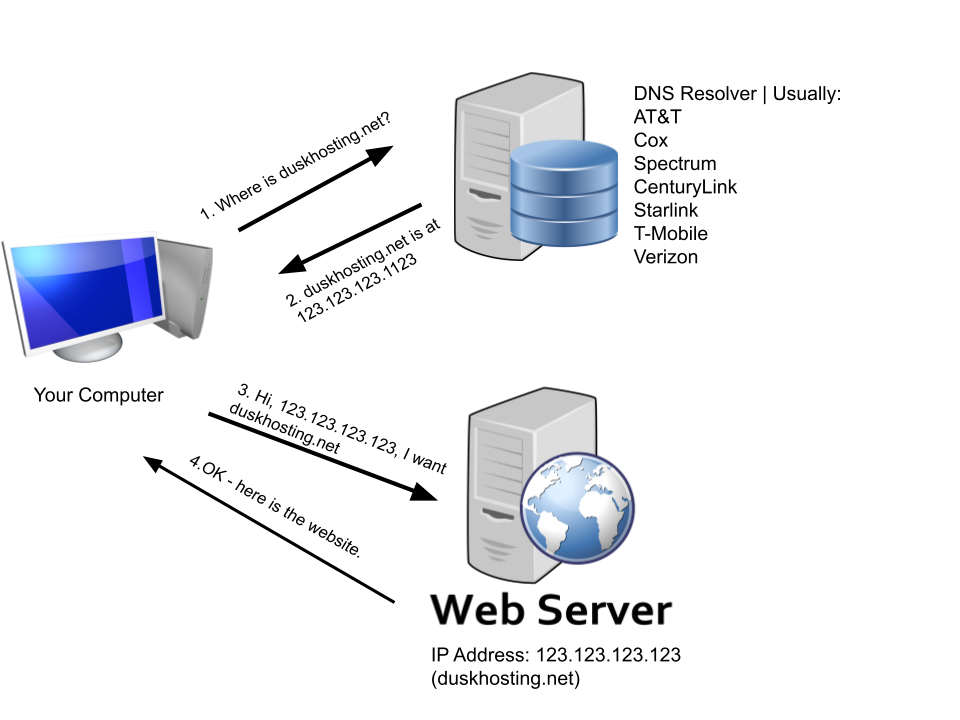
Let's break this down. Let's say you want to visit duskhosting.net. To do that, you must know where duskhosting.net lives, and more specifically the IP Address of the web server where duskhosting.net is hosted - your device doesn't know where duskhosting.net lives on it's own.
First, we reach out to the DNS Resolver - this is typically ran by your Internet Provider. We ask it "Where is duskhosting.net?". Second, The DNS Resolver then responds with the IP Address where duskhosting.net is located. Third, now that we know the IP address of duskhosting.net, we can ask for and retrieve the website from the web server.
And that's the basics of how DNS Works -- but let's add one additional piece into the puzzle, the Authoratative DNS Server.
Authoritative DNS Server
The Authoritative DNS Server is where the actual records of your domain can be changed and modified - such as the IP Address of the Web Server hosting your website. This is typically your Domain Registrar - which is the company who you own your domain through.
When someone looks up your website, the DNS Resolver first looks at the Authoritative DNS Server for the most up-to-date records.
So, through your Domain Registrar / Authoritative DNS Server, you can change your DNS Records. There are four primary parts to a DNS Record.
- Record Type - Defines what kind of record you are setting
- Host - The part of your domain that the record applies to - "@" or just "yourdomain.com" is most common, this would just be your root domain name - but it's value could also be a subdomain such as blog.yourdomain.com
- Value - The value of the Record, such as an IP Address of a server
- TTL - How long the record stays valid before DNS Servers should check again for new info.
These are some common record types you can set,
| Record Type | Definition | Example Host / Value |
| A | AKA "Address Record" - Maps your Domain Name to an IP Address | yourdomain.com / 123.123.123.123 |
| TXT | Stores text records - typically used when verifying ownership of your domain with a third-party like Google or Microsoft. Also used for various e-mail policy settings. | yourdomain.com / "google-verification:abcdefg-hijklmnop" |
| MX | Defines a mail server - when someone sends an email to your domain, this is the server it will go to. Microsoft 365 or Google Workspace is very common for this. | yourdomain.com / duskhosting-net.mail.protection.outlook.com |
| CNAME | Defines an alias - this subdomain actually points to another domain | www.yourdomain.com / yourdomain.com |
And these are some examples of how records might look in practice.

As a review, and to show how it works here, we'll go through these records.
- A - yourdomain.com - 123.123.123.123
- yourdomain.com lives on the server 123.123.123.123
- CNAME - www.yourdomain.com - yourdomain.com
- www.youdomain.com is the same as yourdomain.com
- MX - yourdomain.com - yourdomain-com.mail.protection.outlook.com
- yourdomain.com's mail server is yourdomain-com.mail.protection.outlook.com, a mail server that looks like this is common if you use Microsoft 365 for E-Mail, which is highly recommended.
- TXT Records
- In this particular case, these records define E-Mail Policies - they're a bit out of scope for this article but just know that they define how email being sent from your server is handled by receiving mail servers.
Terminology Review:
DNS Resolver: Typically ran by your Internet Service Provider - it's role is to respond to queries from your device when you want to know where a particular domain name is. It responds with an IP Address of a server.
Authoritative DNS Server: Typically your Domain Registrar or Hosting Provider. It's where your DNS Records (A, TXT, MX, etc.) are stored, and where you can manage and change your DNS Records. When someone looks up your website, the DNS Resolver looks at the Authoritative DNS Server to get these records.
This has been a basic, high-level introduction to DNS - if you have any questions, please reach out to us at support@duskhosting.net or create a ticket in your portal.
For a more comprehensive guide on how DNS Works, check out this article by LayerLogix
Important Note: Setting up e-mail tends to need slightly more advanced DNS Configurations that are not fully covered in this article - if you use Dusk Hosting, you can reach out to us for e-mail options, or, check out this article about DNS Configuration for mail servers by Tecadmin.